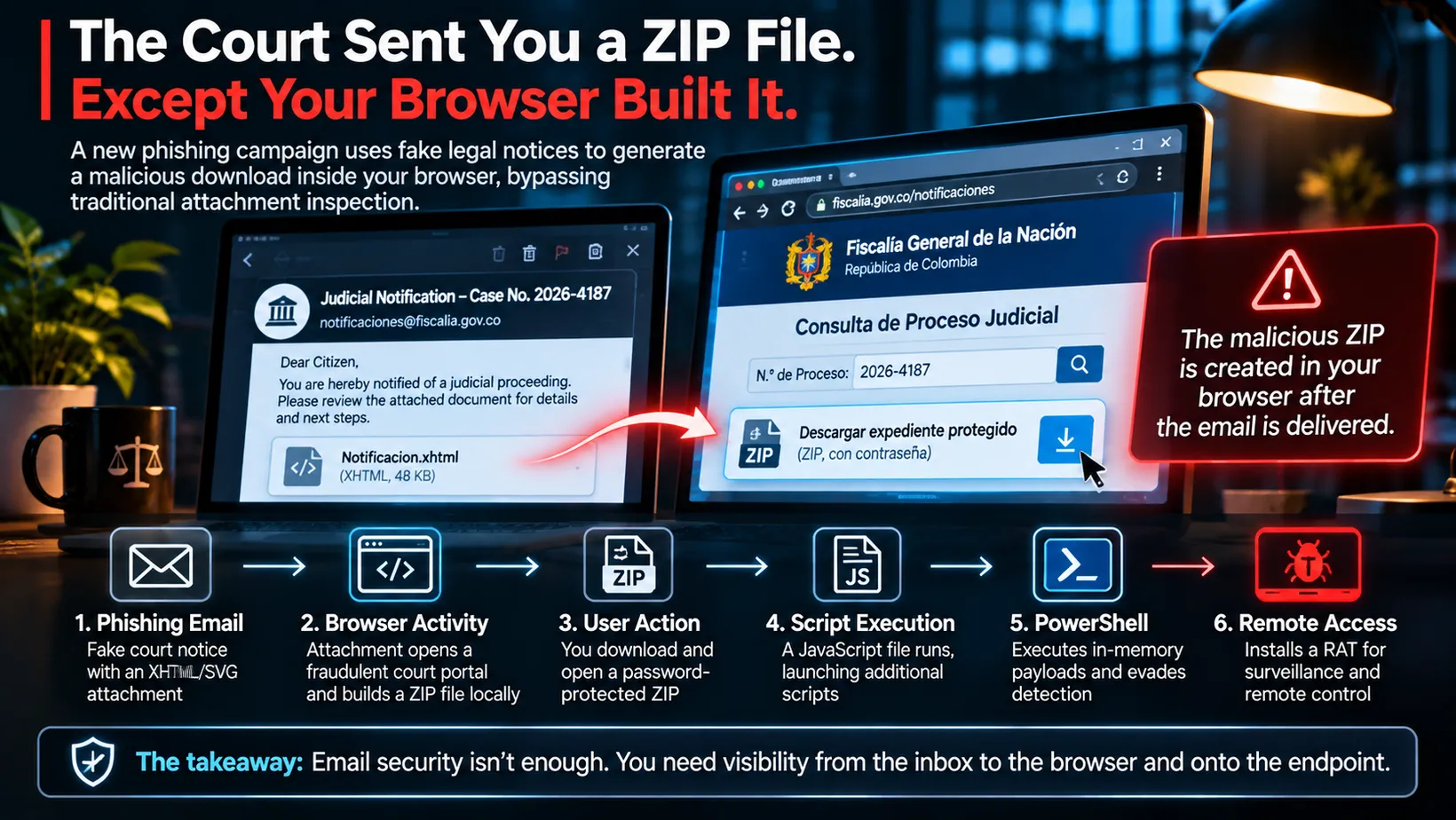
We’ve spent years inspecting email attachments. Now the browser is assembling the malware for us.
There’s something uniquely effective about receiving an email that says you’re involved in a legal proceeding.
Most phishing emails try to convince you that something wonderful happened.
You won something.
You’ve received a refund.
A package is arriving.
Someone wants to share a document.
But a court notice?
That’s different.
Nobody wants to casually ignore something that looks like it came from a judge, attorney, or government agency.
Even if you’re pretty sure you haven’t done anything wrong.
Which, let’s face it, is a low bar for a Tuesday.
Now imagine receiving a legal notice that appears reasonably official.
It has a case number.
Institutional language.
A document attachment.
Maybe even an official-looking government portal where you can look up the case.
You open it.
The portal loads.
It asks you to download a protected document.
Everything looks legitimate.
Except your browser just assembled the malicious attachment itself.
And that is the interesting part of a recently documented campaign targeting organizations in Latin America.
A Fake Court Notice With a Very Real Payload
On November 4, 2026, security researchers at ZenoX published an investigation into a phishing campaign associated with APT-C-36, also known as Blind Eagle.
The operation targeted organizations in Latin America using Portuguese and Spanish-language messages resembling legal and administrative notifications.
These included fake court proceedings, judicial citations, government communications, and other official-looking documents.
ZenoX initially analyzed 12 fraudulent emails, along with the accompanying archives, scripts, infrastructure, and final remote-access malware.
Researchers subsequently told The Hacker News they had observed nearly 3,300 malicious emails across the broader campaign between late October and early November.
That’s significant activity.
But let’s make something clear before we start declaring the fall of civilization.
ZenoX could not confirm successful infections at real-world targets.
The complete malware chain was reconstructed through controlled laboratory analysis.
That means the researchers demonstrated what the code was capable of doing.
It doesn’t establish that thousands of organizations were compromised or that every attempted attack succeeded.
Those distinctions matter.
The technical findings are troubling enough without turning every phishing email into a confirmed breach.
The Attachment Wasn’t What It Seemed
Let’s walk through the attack.
One analyzed email claimed to be a legal notice from a Colombian judicial authority.
It included an attachment with an .xhtml extension.
For most people, that probably looks like another document format.
Maybe a webpage.
Maybe something the government uses.
Who knows?
Government technology has rarely been accused of making things simple.
But the file wasn’t a normal court document.
ZenoX found that the attachment contained SVG-based content disguised as XHTML.
SVG stands for Scalable Vector Graphics.
It’s a legitimate format commonly used for logos, icons, and graphics.
Unlike a simple JPEG, SVG can contain structured markup and, depending on how it’s handled, active content.
The attachment opened a page that imitated Colombia’s Fiscalía General de la Nación.
It had the visual elements you would expect from an official portal.
A government-style header.
A case lookup interface.
Document information.
A process identifier.
The goal was simple.
Make the recipient believe they were interacting with a legitimate judicial system.
And once they accepted that illusion, move them to the next step.
The Browser Built the ZIP File
This is where the attack gets interesting.
Instead of sending the malicious ZIP archive directly through email, the attackers arranged for the attachment to generate the ZIP locally inside the browser.
The technique is called HTML smuggling.
It isn’t new.
Microsoft documented HTML smuggling as a growing malware-delivery technique back in November 2021.
The concept is straightforward.
An attacker embeds encoded content and JavaScript inside an HTML document.
The browser processes that information and reconstructs a file on the user’s computer.
The resulting download can appear to be an ordinary file.
But it was assembled locally, after the original email had already been delivered.
Why does that matter?
Because traditional email security products inspect what passes through the mail system.
They can examine attachments.
They can inspect compressed archives.
They can detonate suspicious files.
They can analyze URLs.
But in this case, the malicious ZIP was not present as an ordinary ZIP attachment in the original message.
The browser created it after delivery.
The email gateway may have examined the XHTML file without ever receiving the final archive as a separate attachment.
It’s a little like airport security inspecting your suitcase and then discovering you assembled something prohibited after walking through the checkpoint.
The original inspection isn’t necessarily defective.
The dangerous thing simply didn’t exist in its final form yet.
And that distinction matters when designing security controls.
Then Came the Password-Protected Archive
The browser-generated ZIP used ZipCrypto encryption and presented a password to the user.
Password-protected archives are common in legitimate business workflows.
Legal documents.
Financial statements.
Confidential records.
But they are also useful to attackers because encryption can limit what certain inspection tools can examine.
The archive in this campaign contained a JavaScript file disguised as a utility called:
Network Configuration Auditor v2.7.298
That’s a fairly clever name.
It sounds technical.
It sounds administrative.
It sounds like something a government system might ask you to install.
And most people have no idea what a network configuration auditor does.
Frankly, half the people who work in IT would probably have to Google the specific product name.
But the JavaScript file wasn’t a legitimate diagnostic tool.
It was a malware loader.
And there’s another distinction worth emphasizing.
The browser didn’t automatically execute the final malware simply because the page opened.
The attack required the recipient to open the archive and execute the JavaScript file.
No browser zero-day exploit was demonstrated in the ZenoX findings.
The criminals were relying on social engineering.
They needed the human to keep following instructions.
That’s an important opportunity for defenders.
From JavaScript to PowerShell to Remote Access
Once the user executed the JavaScript file, the next stages became considerably less friendly.
The script began collecting information about the Windows environment.
Operating system details.
Computer name.
Memory.
Network configuration.
Windows Registry information.
Directory locations.
Environment variables.
That information could help the malware understand where it was running and how to continue.
The code then reconstructed additional stages.
ZenoX documented a chain involving JavaScript, VBScript, and PowerShell.
The VBScript stage included techniques intended to interfere with Windows security monitoring through AMSI and ETW.
AMSI is Microsoft’s Antimalware Scan Interface, which allows supported security products to inspect certain scripts and other content.
ETW, or Event Tracing for Windows, provides an important source of operating-system telemetry.
Attackers try to interfere with these systems because they help defenders see what malicious software is doing.
The chain also attempted to remove the original XHTML artifact, manipulate Mark-of-the-Web metadata, and establish persistence through the Windows Startup folder.
The final PowerShell stage decrypted and loaded a remote-access Trojan into memory.
The RAT was classified by ZenoX as an AsyncRAT variant with DCRat lineage.
Now we’ve moved a long way from a suspicious court document.
We’ve got scripts.
Persistence.
Defense evasion.
PowerShell.
And remote-access malware.
All because somebody thought they needed to review a legal notice.
The Final Payload Was Built for Surveillance
A remote-access Trojan, or RAT, gives an attacker the ability to interact with an infected computer.
The payload ZenoX examined included capabilities for:
- Remote desktop access
- Keystroke monitoring
- Screen capture
- Collection of local documents
- Token impersonation
- Remote control of the user session
- Encrypted communication with an attacker-controlled server
Some of the functionality involved creating a separate desktop session that could be used without displaying everything on the user’s normal screen.
That’s important because it can allow malicious activity to occur without obvious visual signs.
The malware also included mechanisms for persistence.
Restarting the computer wouldn’t necessarily eliminate it.
Again, these were capabilities demonstrated or identified during laboratory examination.
ZenoX did not confirm that those surveillance functions were used successfully against real organizational victims in this campaign.
But the intended objective is clear.
The attackers wanted persistent remote access to the machines of people handling sensitive information.
And their chosen lure made that access more plausible.
Blind Eagle Has Used This Playbook Before
One reason this research deserves attention is that the techniques match a broader history.
Blind Eagle isn’t a newly discovered group.
MITRE ATT&CK identifies APT-C-36 as a suspected South American threat actor active since at least 2018.
The group has targeted government institutions and organizations in financial services, energy, and other sectors, particularly in Colombia and Latin America.
Its documented techniques include spearphishing, compromised email accounts, encoded payloads, JavaScript, PowerShell, and remote-access Trojans.
And this isn’t the first time researchers have seen Blind Eagle use fake judicial communications.
In September 2025, Zscaler ThreatLabz identified a campaign targeting a Colombian government agency.
The attackers used an email that appeared to originate from within the organization.
The message referenced a legal proceeding.
It included a malicious SVG attachment.
That SVG opened a fake judicial portal.
The resulting attack chain involved JavaScript, PowerShell, a downloader called Caminho, and a DCRat payload.
Sound familiar?
Different campaign.
Different details.
Very similar approach.
That history gives the latest ZenoX research additional credibility.
The November 2026 campaign isn’t being evaluated in isolation.
Researchers are comparing it with previously documented tools, infrastructure patterns, and attacker behavior.
Attribution still involves judgment, but the technical lineage has supporting evidence.
Here’s the Part That Should Make Email Administrators Pay Attention
In one of the emails ZenoX analyzed, the message authentication checks showed:
SPF: Pass
DKIM: Pass
DMARC: Pass
Now, if you work in email security, you already know where this is going.
If you don’t, this is worth understanding.
SPF helps validate whether a sending server is authorized for a domain.
DKIM uses a cryptographic signature to help verify that signed message content hasn’t been modified.
DMARC evaluates alignment with the domain appearing in the From address and provides policy guidance for authentication failures.
All useful.
All important.
But none of them proves the content of an email is safe.
And none of them proves that a person claiming to represent a court actually works for that court.
The Messaging, Malware and Mobile Anti-Abuse Working Group explicitly explains that email authentication does not establish the quality, truthfulness, or legitimacy of message content.
Here’s a simpler way to think about it.
SPF, DKIM, and DMARC can help establish that an email came through an authorized sending arrangement.
They cannot establish whether the person sending it is lying.
If an attacker controls a legitimate email account or uses an authorized sending service, the authentication checks can pass.
Authenticated doesn’t mean trustworthy.
We learned this years ago with valid credentials.
Now email would like another turn.
This Is Where the Security Model Starts Breaking Apart
Think about the complete attack from a security operations perspective.
The email gateway sees an XHTML attachment.
The user opens it.
The browser creates a ZIP file.
The user extracts it.
Windows Script Host executes JavaScript.
The JavaScript starts additional scripts.
PowerShell loads a remote-access payload into memory.
The malware attempts to establish persistence and communicate with an external server.
Now ask a very practical question.
Can your security tools connect all those activities into one incident?
Or do they exist in completely separate monitoring systems?
Email security sees the original message.
Browser security sees the webpage.
Endpoint security sees script execution.
Network security sees outbound traffic.
A SIEM might see some of the logs.
But who connects the dots?
Because if those technologies operate independently, the attack can move between them without anyone seeing the complete picture.
That’s the larger lesson of this campaign.
Not that HTML smuggling is unstoppable.
Not that email security is obsolete.
But that the attacker is exploiting the handoff between security controls.
And those handoffs deserve attention.
Start by Treating HTML and SVG Attachments as Active Content
A lot of people still think of SVG as an image.
And HTML as a webpage.
Those are reasonable descriptions.
But depending on the content and how it’s opened, both formats can participate in active browser behavior.
Organizations should evaluate whether users genuinely need to receive standalone HTML, XHTML, or SVG attachments from external senders.
For many departments, the answer may be no.
For others, particularly developers, designers, and technical teams, the answer may be yes.
That’s where risk-based policy comes in.
Possible controls include:
- Restricting external HTML, XHTML, and SVG attachments where business requirements allow
- Inspecting the actual content and file type, not just the extension
- Detecting suspicious embedded JavaScript and encoded content
- Using detonation environments that execute active browser content
- Examining files generated during detonation, not just the original attachment
That final point is especially important.
If your sandbox opens the XHTML file but doesn’t follow the locally generated download, it may miss the most dangerous part of the attack.
MITRE ATT&CK documents this behavior as T1027.006: HTML Smuggling.
Stop Letting Random Scripts Execute From Downloads
This may be one of the most practical defenses.
In the ZenoX attack chain, the recipient ultimately had to run a JavaScript file.
On Windows, that can involve Windows Script Host through wscript.exe or cscript.exe.
These are legitimate Windows components.
They also make very useful tools for malware.
For many ordinary users, there is no business reason to execute downloaded JavaScript or VBScript files through Windows Script Host.
An organization can use application-control policies to restrict that behavior.
Windows App Control for Business and AppLocker provide options for controlling script execution.
Microsoft also documents Attack Surface Reduction rules that can interfere with malicious script activity, including rules for obfuscated scripts and JavaScript or VBScript launching downloaded executable content.
These controls aren’t all interchangeable, and an ASR rule designed to block a downloaded executable won’t necessarily stop every memory-loaded payload.
But that doesn’t make them useless.
It means the protections should be layered.
If an employee downloads a ZIP file and tries to run an unknown JavaScript file from their Downloads folder, the default response shouldn’t always be:
Sure. Why not?
We’ve had enough years of Windows malware to know where that road leads.
Watch the Process Chain, Not Just the File
This is where endpoint detection becomes particularly useful.
The original XHTML attachment may not contain the final malware as a normal executable file.
The ZIP is generated locally.
The JavaScript may be obfuscated.
The final payload may run primarily in memory.
So relying entirely on matching a known malicious file hash is unlikely to provide sufficient coverage.
Instead, look for behavior.
For example:
- A browser creates a ZIP or script in a user directory after opening local HTML content
- The user executes a newly downloaded JavaScript file
wscript.exeorcscript.exelaunches- Script execution is followed by suspicious PowerShell activity
- PowerShell loads unusual .NET assemblies or performs suspicious decoding
- Startup-folder entries appear unexpectedly
- Security inspection or logging appears to be tampered with
- The endpoint establishes suspicious outbound communication
There is an important technical nuance here.
Because a human manually opens the generated ZIP and executes the script, the browser doesn’t necessarily appear as the direct parent process of Windows Script Host.
The detection needs to correlate time, file creation, origin, user activity, and subsequent execution, not rely exclusively on one parent-child relationship.
MITRE publishes a detection strategy specifically for HTML smuggling involving browser-generated files and subsequent execution.
MITRE Detection Strategy DET0313
That’s the kind of visibility security teams should be testing.
PowerShell Is Another Opportunity to Catch It
PowerShell isn’t malicious.
It is one of the most useful administrative tools in Windows.
Unfortunately, attackers know that too.
In this campaign, PowerShell was used to reconstruct and load the final payload.
Organizations should consider enabling appropriate PowerShell logging and making that telemetry available to their endpoint detection and SIEM tools.
Microsoft documents Script Block Logging, which records PowerShell script activity and can help investigators reconstruct suspicious behavior.
The goal isn’t to alert every time PowerShell executes.
That would create a spectacular amount of noise.
The goal is to identify combinations that don’t make sense.
A finance employee receives a court notice.
A browser generates a ZIP.
A JavaScript file executes.
PowerShell begins decoding unusual content.
A new Startup entry appears.
Now we have something worth investigating.
The context makes the difference.
Don’t Forget About Persistence
One of the more interesting aspects of the ZenoX findings is that the malware attempted to create a startup mechanism that could reconstruct its components.
That means removing the original downloaded file might not be enough.
If an endpoint is suspected of executing this chain, responders should examine:
- Windows Startup-folder entries
- Unexpected scripts in user-profile directories
- Suspicious copies under public user directories
- Newly created persistence mechanisms
- Unusual PowerShell activity
- Remote-access processes and outbound connections
ZenoX identified specific artifacts, including an XHTML file under the user’s application-data directory and a VBScript-based Startup shortcut.
Those are useful hunting leads.
But file names can change.
Behavior-based detection should remain the primary strategy.
Network Controls Still Matter
The final payload included command-and-control capabilities.
ZenoX identified infrastructure used for delivery and remote communication, including a dedicated command-and-control host.
That’s important for threat hunting.
But I wouldn’t build the entire defense around blocking one IP address.
Attackers can change infrastructure.
Dynamic DNS records can move.
Cloud hosting providers use shared infrastructure.
And one of the delivery domains in this campaign was served through Cloudflare’s shared proxy network.
Blindly blocking those shared edge IP addresses would risk disrupting unrelated legitimate services without necessarily stopping the attacker’s origin infrastructure.
ZenoX itself cautions against treating shared Cloudflare addresses as attacker-owned servers.
Instead, organizations should focus on:
- Relevant threat-intelligence indicators
- DNS and proxy telemetry
- Unusual outbound connections
- Newly encountered destinations
- Unexpected remote-access traffic
- Endpoint activity correlated with the destination
The IP address matters.
The story surrounding it matters more.
What Should Regular Users Do?
Not everyone reading this manages an EDR platform.
Some people just want to know whether they should open a message that says they’ve been sued.
Fair question.
Here’s where I’d start.
Don’t treat urgency as authenticity.
A message claiming legal consequences is designed to make you act quickly.
Verify court notices independently.
If the notice claims to come from a government agency or court, look up that agency’s official website and contact information yourself.
Don’t rely on the links or phone numbers inside the suspicious email.
Be suspicious of unexpected HTML, XHTML, and SVG attachments.
Those aren’t necessarily malicious file types, but they’re unusual ways to deliver many ordinary legal documents.
Never run a JavaScript file because a website says it’s needed to view a document.
A genuine document shouldn’t require you to execute an unfamiliar Windows script.
Don’t assume a password-protected ZIP is safer.
Encryption protects confidentiality. It doesn’t establish that the contents are trustworthy.
Keep your security software and operating system updated.
And if something seems wrong, report it before continuing.
That last one matters.
The attack requires human interaction at several stages.
Stopping anywhere along the chain can prevent the payload from executing.
If Someone Already Opened It, What Then?
If someone merely opened the XHTML page, that doesn’t establish that the device was infected.
The ZenoX campaign depended on additional execution steps.
But if the user extracted the archive and ran the JavaScript file, the risk is significantly different.
That’s when I’d recommend treating the endpoint as potentially compromised.
For an organization, that means:
- Isolating the affected endpoint when there is evidence of suspicious execution
- Preserving relevant files, browser downloads, and telemetry
- Reviewing Windows Script Host and PowerShell execution
- Checking for persistence and security-control tampering
- Investigating external connections
- Reviewing whether credentials or sensitive information may have been exposed
- Rebuilding the endpoint when trust cannot reasonably be restored
If credentials may have been accessed, revoke sessions and rotate affected credentials from a trusted system.
And don’t assume deleting the email fixes the problem.
The email was just the invitation.
The dangerous work happened afterward.
The Real Problem Isn’t That Email Security Failed
I think this is where the conversation needs to mature.
It’s tempting to read research like this and conclude:
Email gateways can’t stop modern phishing anymore.
That’s not what the evidence establishes.
Email security can still detect suspicious attachments, malicious URLs, impersonation, and known malware.
Good products also support more sophisticated content inspection and detonation.
But no single control sees every stage of every attack.
A file may be harmless-looking until the browser transforms it.
A download may be suspicious only when executed.
A PowerShell command may be legitimate in one context and malicious in another.
A remote connection may be normal for one application and deeply suspicious for an employee who just opened a court notice.
The useful question isn’t:
Which security product failed?
It’s:
Did the security program preserve enough visibility to recognize the attack as it moved between systems?
That’s where the improvement opportunity lives.
The Question I’d Ask Every Security Team
If I were discussing this campaign with a security team, I’d start with one question.
Can we follow an attachment into the browser and onto the endpoint, or does our visibility stop at the email?
Then I’d get more specific.
Can you tell when an HTML attachment creates a ZIP?
Can you identify which process wrote the file?
Can you correlate the download with the original email?
Can you detect execution through Windows Script Host?
Can you see the PowerShell activity afterward?
Can you identify new persistence?
Can you correlate suspicious network connections with the original user activity?
And, most importantly:
Can you put all of those things into one incident instead of five unrelated alerts?
Because the attacker isn’t thinking in terms of email security versus browser security versus endpoint security.
They’re thinking about completing the chain.
Defenders need to see the chain too.
The Browser Didn’t Betray You. It Did What It Was Told.
That’s probably the most important takeaway from this research.
The browser wasn’t compromised through some newly discovered vulnerability.
It processed active content.
The file-generation mechanism worked.
The ZIP archive was created.
The user was expected to run a script.
And the malware used familiar Windows components to continue.
The attack exploited the way legitimate technologies interact.
HTML.
SVG.
ZIP archives.
JavaScript.
VBScript.
PowerShell.
Remote-access software.
None of those technologies is inherently malicious.
But combine them with social engineering and a little creativity, and you have a capable malware-delivery chain.
Which is why cybersecurity cannot be reduced to checking whether a file extension is on the naughty list.
We have to understand what happens after the user interacts with it.
The next attack probably won’t be an identical fake court notice.
It may be an invoice.
A shipping document.
A tax notice.
An employment form.
A benefits enrollment message.
Or something else that makes someone think:
I should probably open that.
The lure will change.
The technique will evolve.
But the defensive principles remain familiar.
Inspect what you can.
Restrict unnecessary execution.
Monitor behavior.
Correlate activity.
And make sure your security controls can follow the attack beyond the inbox.
Because sometimes the malicious file isn’t the attachment that arrived.
It’s the file your browser helpfully created afterward.
And if that isn’t an excellent reason to rethink where our visibility ends, I don’t know what is.
Sources & Further Reading
- ZenoX’s November 4 research reconstructs the judicial-themed phishing chain, browser-generated ZIP, script stages, persistence, and final remote-access payload. ZenoX
- The Hacker News reports ZenoX’s later observation of nearly 3,300 malicious emails and confirms that successful real-world infections were not established. The Hacker News
- Zscaler ThreatLabz independently documented an earlier Blind Eagle campaign using fake judicial notices, malicious SVG content, JavaScript, PowerShell, and DCRat. Zscaler
- Microsoft explains how HTML smuggling creates malicious files inside browsers after content passes perimeter security inspection. Microsoft Security
- MITRE documents Blind Eagle’s broader techniques and the HTML-smuggling detection methods defenders can use. MITRE APT-C-36 and MITRE HTML Smuggling
- M3AAWG explains why successful SPF, DKIM, and DMARC checks do not prove an email’s contents are safe or truthful. M3AAWG
- Microsoft documents application-control, Attack Surface Reduction, and PowerShell logging features that can help prevent or investigate these attack chains. Microsoft ASR and Microsoft App Control