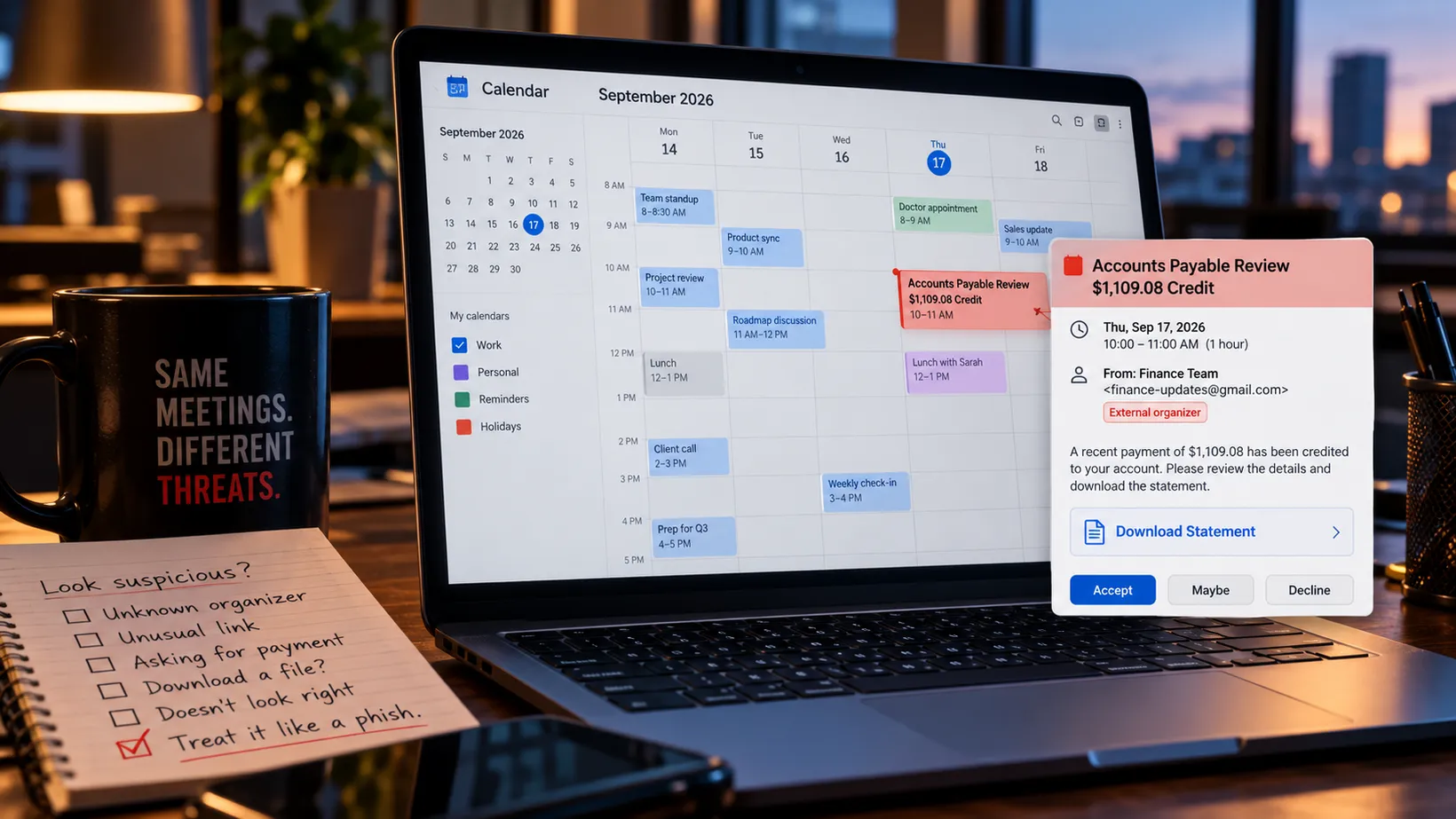
We spent years teaching people not to trust unexpected email. Nobody remembered to tell the calendar.
My calendar may be the most boring application I use.
Meetings.
Lunch.
A dentist appointment I will absolutely forget about if my phone does not remind me.
Another meeting that could have been an email.
It is not where most people expect malware to show up.
Attackers seem to have noticed.
Sublime Security says it has seen a dramatic rise in attacks delivered through calendar invitations. In its own telemetry, malicious calendar-based attacks increased 282% month over month in June 2026, 338% in July, 1,216% in August, and were projected to rise another 2,852% in September based on activity seen during the first half of the month.
Those are Sublime’s customer observations, not a measurement of every calendar attack on the internet, but the trajectory is difficult to ignore.
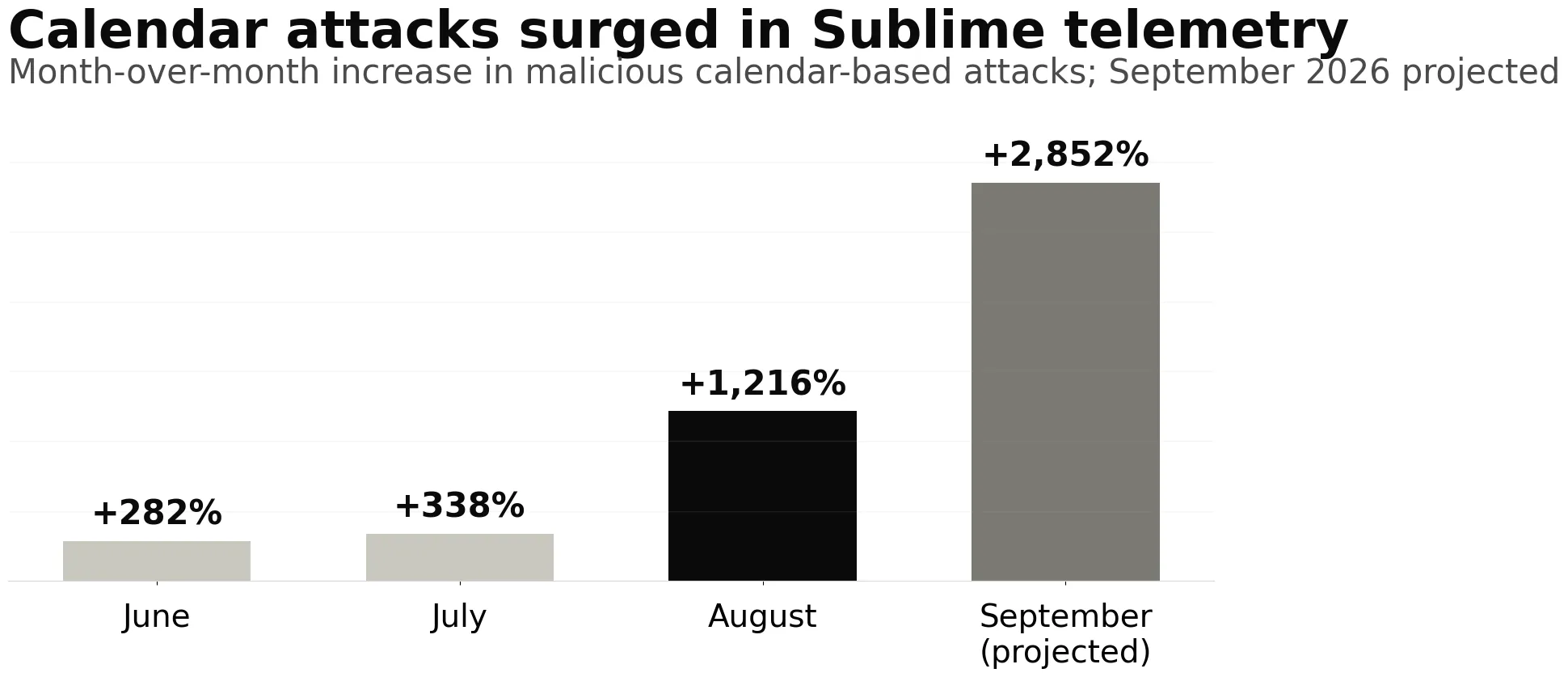
Source: Sublime Security telemetry, September 2026. September is projected from activity observed during the first half of the month; these are Sublime-observed increases, not industry-wide incident counts.
And Sublime is not the only one seeing it.
Microsoft documented a June campaign that targeted more than 107,000 users across nearly 19,000 organizations using an ICS calendar invitation as part of a multi-stage malware chain.
Cofense has documented credential theft and remote-access malware delivered through fake invitations.
Abnormal added calendar-event remediation to Microsoft 365 and Google Workspace after seeing malicious invitations persist as a phishing vector.
Proofpoint has separately documented abuse of calendar workflows that can operate outside traditional email inspection.
So no, this is not one security vendor discovering a scary-looking chart and deciding Marketing should have a good Thursday.
The calendar has become an attack surface.
The ICS file is not the villain
First, some terminology.
ICS is the common shorthand for the iCalendar format used to exchange meeting and event information.
That is normal.
Your dentist can send one.
Your airline can send one.
Your coworker can send one.
An .ics attachment is not malware simply because it is an .ics attachment.
The problem is what an attacker can place around or inside the invitation:
- Malicious links
- Callback phone numbers
- QR codes
- Credential-harvesting pages
- OAuth authorization flows
- Attached files
- Links to malware installers
- Fake financial notices
- Fake meeting and voicemail notifications
The invitation is just the delivery mechanism.
And it works because calendars were designed to make collaboration easy, not because someone at Microsoft or Google sat in a meeting and said:
“You know what would really improve enterprise security? Surprise appointments.”
The calendar gives attackers a second shot
The clever part of ICS phishing is not really the file format.
It is the workflow.
A meeting invitation can show up in your inbox and your calendar.
Depending on the platform and configuration, the event may be added automatically or become visible in the calendar before the user has made a meaningful trust decision.
That creates an awkward security gap.
An email security product may quarantine the original message.
The calendar entry may still be sitting there later.
Sublime highlighted this problem in 2025 when it began removing malicious calendar entries alongside quarantined emails. Abnormal built similar remediation for Outlook and later Google Workspace.
Different products handle the problem differently, but the common lesson is simple:
Deleting the email is not necessarily the same thing as cleaning up the calendar.
That matters because humans treat calendars differently.
An email from a stranger asking you to download an invoice feels suspicious.
A calendar entry labeled:
Accounts Payable Review - $1,109.08 Credit
can feel like something you forgot about.
That little bit of context changes the conversation.
One recent attack used almost nothing but legitimate services
The September Sublime example is a good illustration because the attack chain contains remarkably little exotic infrastructure.
The invitation came from Gmail through Google Calendar.
The lure claimed there was a recent financial transaction requiring attention.
The link led to a page hosted on Framer, a legitimate website-building platform.
The victim was then encouraged to download a roughly 10 MB ScreenConnect installer.
ScreenConnect is also legitimate software.
It is a remote monitoring and management tool used by IT teams.
In this case, the installer included configuration that would let the attacker use the legitimate RMM software for remote control.
Sublime noted that properly configured Microsoft environments could block the download, while weaker configurations or a user overriding the warning could allow the chain to continue.
Look at what the attacker got to borrow:
- Gmail
- Google Calendar
- Google’s redirect infrastructure
- Framer
- ScreenConnect
Four legitimate services.
Very little custom infrastructure.
Very little money.
That is the modern phishing economy in miniature.
Why build an obviously evil website on totally-not-malware.biz when somebody else already built you an entire cloud?
Microsoft saw the same pattern at serious scale
Microsoft’s Q2 2026 threat report provides useful independent validation that calendar invitations are being incorporated into large campaigns.
Between June 14 and 15, Microsoft Defender Research observed a phishing campaign aimed at more than 107,000 users across nearly 19,000 organizations.
The emails impersonated internal financial and staff communications.
Each carried a nested EML file and an ICS calendar invitation.
The EML eventually directed the user through Microsoft’s own authentication infrastructure as part of an attacker-controlled OAuth flow before later stages of the campaign delivered malware.
That campaign is useful because it shows where phishing is heading.
Attackers are stacking trust.
A legitimate-looking internal message.
A calendar invitation.
Microsoft login infrastructure.
OAuth.
Multiple file formats.
Cloud services.
Each individual piece feels familiar.
Together they make the attack harder for both humans and simplistic security controls to reason about.
Calendar phishing is not always malware
Malware gets the dramatic headline, but calendar abuse has several flavors.
Cofense has observed fake Microsoft and Google invitations designed to steal credentials, and more recent invitation-themed attacks that lead victims to remote-access malware.
Sublime saw more than 20% of callback-phishing attacks in Q4 2025 using calendar invites as part of the delivery mechanism.
In callback phishing, the dangerous payload may simply be a phone number and a convincing story.
Abnormal has documented malicious QR codes hidden in calendar-related content.
Proofpoint has even seen criminal interest in putting indirect prompt-injection instructions inside calendar invitations so an AI assistant processing the event could be manipulated.
That is still an emerging technique rather than the everyday calendar-phishing problem, but it is a useful reminder that the calendar is increasingly consumed by software as well as humans.
So the threat is not:
Bad ICS file equals malware.
It is:
A trusted collaboration surface is now carrying the same garbage attackers already put everywhere else.
That distinction matters.
Why this works so well
Calendar phishing has several things going for it.
It looks like work
People expect meetings.
A random ZIP file is strange.
A meeting called Quarterly Budget Review is Tuesday.
It can use trusted infrastructure
Invites may arrive through Google or Microsoft systems.
The fact that Google Calendar delivered the event does not mean Google created or endorsed the content any more than Gmail delivering spam means Google wrote the spam.
But that trusted infrastructure still makes crude reputation blocking less useful.
Calendars create persistence
An email gets deleted.
A calendar event can continue reminding the victim that the fake invoice, meeting, refund, security alert, or voicemail supposedly needs attention.
Nothing says persistence quite like Outlook reminding you of the attack again fifteen minutes before it starts.
Security teams have traditionally focused on email
We have decades of tooling built around inboxes:
- Secure email gateways
- API-based email security
- Spam filters
- Attachment analysis
- URL rewriting
- User reporting buttons
Calendars have not always received the same attention.
Attackers are rarely sentimental about this sort of architectural oversight.
A weird calendar invite does not mean you were hacked
This is worth saying plainly.
If a suspicious appointment appears on your calendar, that does not automatically mean someone compromised your account.
In many cases, the attacker only needs your email address to send an invitation.
Likewise, simply seeing the event is not the same thing as executing malware.
The attack chains described by Sublime, Microsoft, Cofense, and others typically still depend on additional interaction:
- Clicking a link
- Scanning a QR code
- Calling a phone number
- Approving an OAuth request
- Downloading a file
- Running software
That is good news.
It means we still have several opportunities to interrupt the attack.
For users, the rule is boringly simple
Treat unexpected calendar entries the same way you would treat unexpected email.
If you do not recognize the organizer, stop.
If an invite claims you owe money, received a refund, missed a voicemail, or need to review a document, stop.
If it asks you to download software, stop twice.
Things worth checking include:
- Does the organizer’s actual address match the organization being claimed?
- Is a supposedly corporate invite coming from a random Gmail or Outlook account?
- Does the link go where the invitation claims it goes?
- Is there unexpected financial urgency?
- Is the event asking you to call a phone number instead of using normal company channels?
- Is it asking you to install remote-support software?
- Did this meeting appear even though you have never interacted with the sender?
Most importantly, do not assume something is safe simply because it is sitting between your 2 p.m. staff meeting and your 3:30 dentist appointment.
Attackers can use calendars too.
Their availability is excellent.
Google users can tighten invitation behavior
Google Calendar gives users and Workspace administrators control over which invitations are automatically added.
Depending on organizational policy, users can choose:
- Invitations from everyone
- Only invitations from known senders
- Only invitations they have responded to in email
Google also lets users report suspicious Google Calendar events as spam.
For a personal account, Only if the sender is known is a reasonable balance for many people.
For a higher-security environment, requiring a response before adding an external event may be worth evaluating.
There is a usability tradeoff.
Salespeople, recruiters, support teams, executives, and anyone who regularly meets strangers may find aggressive restrictions painful.
Security controls remain stubbornly attached to business reality.
For enterprises, stop treating the calendar as inbox furniture
The larger lesson is for security teams.
Calendar needs to become a first-class security surface.
That means looking beyond whether the original email was blocked.
A practical program should include:
- Visibility into calendar invitations and associated MIME types
- Detection of suspicious links and attachments inside event data
- Correlation between quarantined messages and calendar objects
- Remediation that removes malicious events as well as messages
- Alerts for external or first-time organizers using suspicious business lures
- Monitoring for links to free hosting, URL shorteners, OAuth flows, or unusual download sites
- Endpoint controls around unauthorized RMM software
- Hunting for the same organizer, URL, attachment, subject, or event across the organization
If your email security product quarantines the phish but leaves the malicious meeting on 300 calendars, that is not complete remediation.
That is moving the problem from one Microsoft icon to another.
Remote-management tools deserve special attention
The ScreenConnect example also reinforces an older lesson.
Legitimate remote monitoring and management tools are powerful.
That is why attackers like them.
Organizations should know which RMM tools are approved and which are not.
If nobody in the company uses ScreenConnect, AnyDesk, TeamViewer, Splashtop, or another remote-support platform, a surprise installer for one of them should have a very difficult afternoon.
Application control, EDR detections, restricted software installation, and monitoring for unexpected RMM processes all help here.
The goal is not to declare remote-management software malicious.
The goal is to notice when Accounting suddenly installs the same class of software your help desk uses to take control of computers.
Detection should focus on behavior, not just bad domains
This attack pattern is another reason static blocklists have limits.
The infrastructure may be legitimate.
The Gmail account may be new but valid.
The website builder may be legitimate.
The remote-management software may be legitimate.
So defenders need context.
Sublime highlighted signals including a first-time sender, a free mail account used for a business-looking message, financial urgency, a suspicious call to action, and a link hosted on a free website builder.
Those signals become much more useful together.
One Gmail sender?
Normal.
One Framer link?
Normal.
One calendar invite?
Very normal.
A first-time Gmail sender inviting the controller to discuss an unexpected $1,109 payment and sending them to a newly encountered Framer page that downloads remote-management software?
Now we have a conversation.
Incident response needs to clean up both sides
If a malicious calendar invite gets through, responders should not stop after deleting the email.
The response should answer:
- Is the event still present on affected calendars?
- Who else received the invitation?
- Were links clicked?
- Were OAuth permissions granted?
- Was a QR code scanned?
- Was an attachment opened?
- Was remote-access software installed?
- Did the user call a number in the invite?
- Did the same sender or infrastructure target anyone else?
If OAuth access was granted, revoke the token and investigate the application.
If RMM software was installed, isolate the endpoint and treat it as a potential remote-access compromise.
If credentials were entered, reset them and review the resulting sessions.
And remove the calendar event.
Otherwise the victim gets a reminder tomorrow.
Which is not the kind of persistence MITRE had in mind, but it counts.
The bigger lesson is that phishing is leaving the inbox
This is the part I find most interesting.
We keep calling these email attacks because email is where many of them begin.
But attackers increasingly move through the collaboration tools around email:
- Calendars
- Teams
- Shared documents
- Cloud storage
- OAuth
- Forms
- Chat
- AI assistants
Microsoft said in its Q2 report that malicious voice-phishing attempts through Teams had grown to nearly ten times their mid-2025 baseline by the end of the quarter.
The point is not that Teams is unsafe.
The point is that attackers follow people into whatever communication channel people trust next.
We made the inbox suspicious.
So attackers found the calendar.
We make the calendar suspicious and they will find something else.
Probably the meeting-room thermostat.
It has been acting smug lately.
Don’t panic. Expand the boundary.
The Sublime numbers are eye-catching.
A projected 2,852% month-over-month increase deserves attention.
But it does not mean every calendar invite is dangerous or that the internet has suddenly discovered a fatal flaw in scheduling software.
It means attackers found a useful delivery mechanism and adoption appears to be accelerating.
The defensive response is straightforward:
- Treat calendar events as untrusted content until context says otherwise
- Give security tools visibility into calendars as well as inboxes
- Remove malicious events when the related email is remediated
- Train users to inspect unexpected invitations
- Limit automatic invitation behavior where the business can tolerate it
- Watch for unusual OAuth requests and remote-management tools
- Investigate the full attack chain instead of declaring victory when the email disappears
For years, we told users:
Don’t click suspicious email.
The updated version may need one more line:
And maybe don’t take cybersecurity advice from your calendar either.
It already has enough control over your life.
Sources & Further Reading
Sublime Security
Provides the growth telemetry and the Google Calendar-to-Framer-to-ScreenConnect attack examined in this post.
https://sublime.security/blog/sublime-observes-massive-uptick-in-ics-phishing-and-calendar-based-malware-attacks/
Microsoft Security
Documents a campaign targeting more than 107,000 users across nearly 19,000 organizations using an ICS invitation, nested EML file, OAuth redirection, and later malware delivery.
https://www.microsoft.com/en-us/security/blog/2026/07/23/email-threat-landscape-q2-2026-trends-and-insights/
Cofense
Independent reporting on credential-phishing calendar invitations and invitation-themed remote-access malware campaigns.
https://cofense.com/Blog/Invitation-to-Trouble-The-Rise-of-Calendar-Phishing-Attacks
Abnormal Security
Documents remediation of malicious calendar events in Microsoft 365 and Google Workspace.
https://abnormal.ai/platform/whats-new/o365-calendar-invite-attack-remediation
Proofpoint
Research into calendar abuse outside normal email delivery and emerging calendar-based prompt-injection techniques.
https://www.proofpoint.com/us/blog/email-and-cloud-threats/threat-actors-engineer-attacks-to-evade-email-security
Google Calendar Help
Explains controls for limiting which invitations are automatically added and how suspicious events can be reported.
https://support.google.com/calendar/answer/13159188